Kimi K3: Impressively Capable, Practically Throttled
K3 writes solid code and makes excellent infographics — but a 5-hour cap at $19/month makes sustained coding nearly impossible.
I have been testing kimi.ai and specifically their K3 model for a few weeks now. My use case: coding on a home project where a Raspberry Pi runs a Python server as a personal home hub for agentic AI — orchestrating LLM and API calls as needed. The kind of project where you need a capable model that can hold context and not lose the plot when things get complicated.
K3 vs. Kimi 2.6
The gap between the two models is not subtle. Kimi 2.6 feels like it is roughly where ChatGPT was two years ago when it comes to coding. K3 is a different story — it handles my Raspberry Pi Python project well, stays on track even when I deliberately challenge it, and produces code that actually runs. No complaints about the model itself.
The Cap Problem
The $19/month plan sounds reasonable. It is not — at least not for coding. There is a 5-hour usage window per period, which in practice means: code for 20 minutes, then wait 4 hours and 40 minutes before continuing. What should have taken 2 hours has stretched across 4 days.

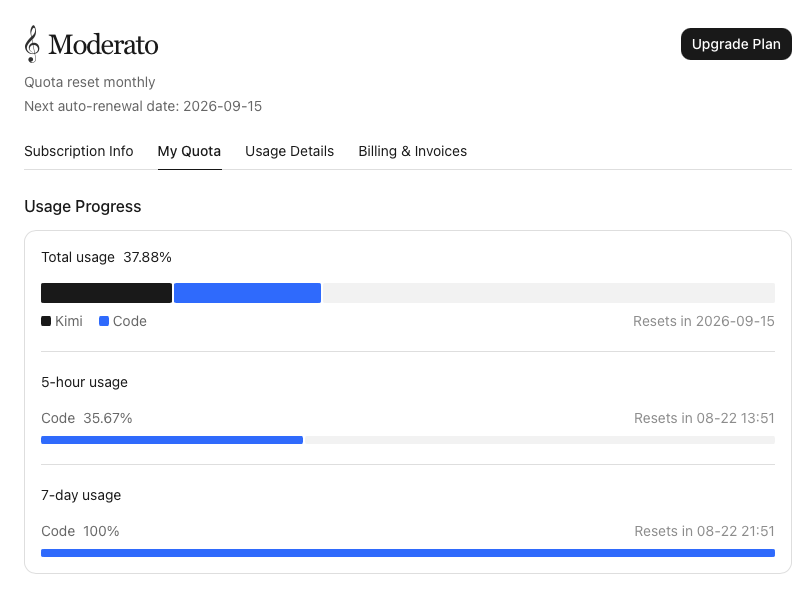
The monthly credit situation is almost absurd: I have used roughly 20% of my monthly credits, but my 7-day credits are already exhausted. That means it is effectively impossible to spend your monthly allocation on coding alone — the 7-day rolling cap cuts you off long before you get close. You are paying for a budget you structurally cannot consume.
Infographics: The Best LLM Experience I Have Had
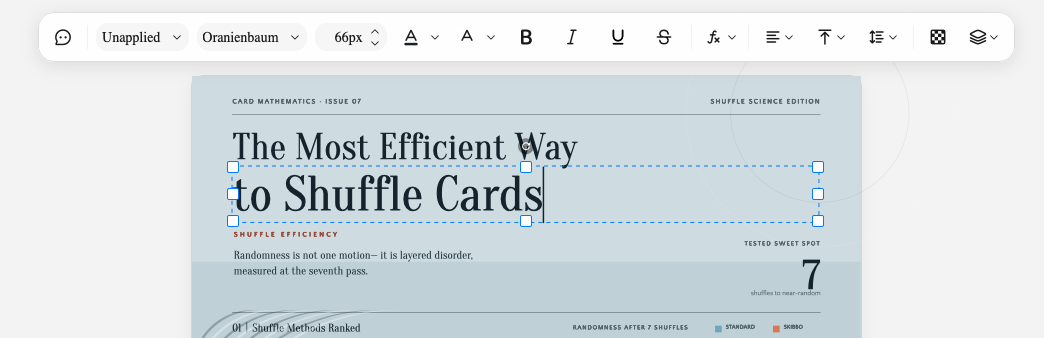
Away from coding, K3 surprised me. I used it to create an infographic and it was the best experience I have had with any LLM for that kind of task. It has a real built-in editor — you can adjust font sizes, move elements around, tweak the layout directly. Not a static export you have to regenerate from scratch every time you want a small change. That is genuinely useful.
Website Generation
I also had it build a small website. It did what I asked, without drama. Nothing to add there.
Summary
- Model quality: K3 is good. Handles complex, multi-file Python projects on real hardware without getting lost.
- Infographics: Outstanding, with a real editor. Best-in-class for this use case right now.
- Coding on the $19 plan: Structurally broken by the 5-hour cap. A task measured in hours becomes a task measured in days.
- Credit design: You cannot realistically use your monthly credits through coding. The 7-day sub-cap is the binding constraint, not the monthly budget.
K3 is a capable model sitting behind a pricing structure that actively prevents you from using it. For occasional infographic work or light one-off tasks it is fine. For any kind of sustained development work, the cap is not a minor annoyance — it is a blocker.